
If you’ve read a lot of nonfiction (or even some fiction!), you may have noticed little annotations at the bottom of every page. They’re not page numbers—they’re footnotes, a sneaky way of getting important information to the reader as they’re reading.
Learning how to use footnotes correctly is essential for students, researchers, and aspiring writers. Keep reading, and we’ll guide you through everything you need to know.
What are footnotes in writing?
Footnotes are numbered references, explanations, or additional context at the bottom of the page in a book. The footnote number matches up with a number somewhere in the text on that page, showing the reader what the note is about. Footnotes are mostly used in nonfiction and academic books, but you’ll occasionally see them in fiction as well.
If the author makes a claim about something that happened or quotes somebody, they’ll often back it up with a footnote. It’s their way of saying, “See, I didn’t just make this up! Here’s where I got this information.” Footnotes can also give additional details about the topic, or show the reader where they can learn more.

Footnotes and endnotes serve similar purposes. The benefit of footnotes vs. endnotes is that the reader can quickly glance at the bottom of the page to see the additional context, rather than having to stop continually and check the back material. The benefit of endnotes vs. footnotes is that the text isn’t interrupted by citations, creating a smooth, unbroken reading experience.
Footnotes vs. endnotes
Footnotes and endnotes have a similar look and function, but they’re found in different parts of a book. In both cases, the author uses tiny numbers in the text, above the relevant line or phrase. Just like with footnotes, the endnote numbers correspond to additional material.
The main difference is that while corresponding footnote citations are placed at the bottom of the page, endnote citations are placed at the very back of the book. In the case of endnotes, a reader has to go to the last few pages and match up the numbers to see what the author has to say about it.
Footnotes vs. works cited
Similar to endnotes, a works cited page appears at the very end of a book. But while footnotes use numerical citations within the text, the works cited doesn’t. The works cited page lists all of the author’s era sources in alphabetical order, similar to a bibliography. Footnotes and endnotes, on the other hand, are listed chronologically as they appear.
A works cited page is not essential to understand the text, but it validates the author’s claims and shows the reader where they can learn more. These are more common in academic texts.
Why are footnotes important for writers?
Footnotes can be used for a few different purposes. They’re especially important for nonfiction writers who want to provide their readers with important background information to support an argument. Using footnotes shows that your claims can be trusted; they’re backed up with real, concrete sources. This gives your book validity and authority.
In academic writing, footnotes are also used to provide supplemental information about a particular idea that the author may not want to spend a lot of time on in the main text. This could include further examples, historical anecdotes, or fun trivia about your topic. They’re not necessary to understand the book—which is why they’re at the bottom of the page instead of inside the narrative—but they add another layer to the story.
In this way, footnotes deepen the reader’s experience. Whether that’s with hard data or bonus material about the subject, they show the reader that this topic is bigger than just what’s on the page.
However, be careful to avoid cluttering your document with a whole army of footnotes. A common mistake writers make is to think that more references equals a higher grade. But really, just one or two footnotes, or two to three sentences, per page is enough to show that you’ve done the work.

Can fiction writers use footnotes too?
Yes! Although it’s less common, some fiction writers do use footnotes in a novel—but usually in a fictional context.
It may be tempting to use factual footnotes in a novel that’s heavy with cultural jargon or historical context, but this will likely have the opposite effect from what you intended—it will pull the reader out of the story. A factual footnote reminds the reader that what they have in front of them isn’t real.
But, footnotes can be used fictitiously to broaden the story world and enhance the narrative voice. A great example of this is in Jonathan Stroud’s fantasy trilogy that begins with The Amulet of Samarkand, which uses footnotes in the voice of its antihero narrator. This character has been alive for a long time, and has been around the block. He knows a thing or two about the supernatural world.
The footnotes create the impression that this is a knowledgeable, experienced figure who could tell us a lot about what’s really going on in the shadows. Here’s what it looks like:
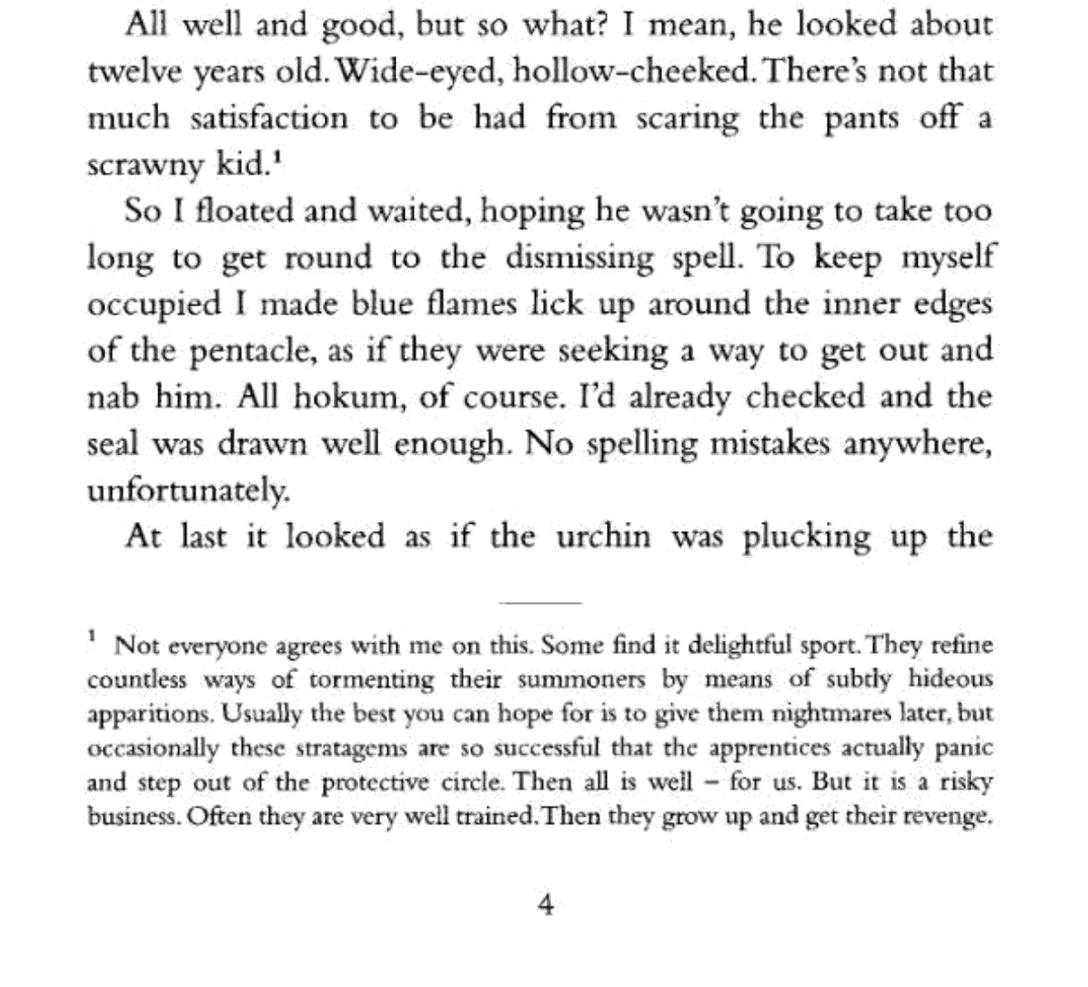
So footnotes do appear in fiction from time to time. But they work best when they’re a part of the story, rather than the author trying to explain the story.

How to properly format your footnotes
Now that we know what footnotes are and why we might want to use them, let’s look at how to properly format them on the page. If you’re not sure which style to use, ask your publisher or instructor for the exact format they’re looking for.
Personal notes, like the fiction example we looked at above, don’t generally need formal citations. But if you’re referencing another publication, use one of these formats below. Pay attention to the specific punctuation, as some instructors can be sticklers about this.
Footnotes in Chicago style
To include citation footnotes sources in Chicago style, use the author’s full name, the name of the publication, and the date published. It looks like this:
Books: Author First Name Last Name, Book Title (City of Publication: Publisher, Year), Page Number.
Ted Gioia, Delta Blues: The Life and Times of the Mississippi Masters Who Revolutionized American Music (New York: W. W. Norton, 2008), 126.
(Note: if you don’t know where the book was published, just leave the city part blank.
Journal articles: Author First Name Last Name, “Article Title,” Journal Name, Volume, no. Issue (Year): Page Number, URL (if applicable).
Jane Garry, “Choice of Roads, Motif N122.0.1 and Crossroads, Various Motifs.” Archetypes and Motifs in Folklore and Literature, Volume 1 (2004), 60.
Websites: Author First Name Last Name, “Webpage Title,” Website Name, Month Day, Year, URL.
Annabel Grossman, “The unlikely tourism success story emerging in the Mississippi delta,” Independent, May 29, 2026, https://www.independent.co.uk/travel/north-america/usa/clarksdale-tourism-mississippi-delta-blues-b2983178.html.
Depending on your source, you may not know or need all of this information. Include as much detail as you can. If you’re citing the same source again later in the work, you can use a shortened citation: The author’s last name, an abbreviated title, and a page number. But if it’s the first reference, use the entire citation.
Footnotes in MLA style
MLA style uses footnotes primarily for additional commentary, examples, or further reading. Sources will usually be cited in the endnotes. An MLA footnote might look like this:
2For an expanded analysis of this theme, see Gussow 129—136 and Evans 89—91.
MLA footnotes are a way of saying “I have more thoughts to share about this, but let’s stay on topic.” Any works referenced here will be formally cited at the back of the book, similar to the citation format we looked at for Chicago style. That way the reader can go back and reference this note when they’re looking for further information.
Footnotes in AP style
Footnotes are used less commonly in AP (or APA) style than others; instead it uses in-text citations for the majority of applications. But content footnotes still appear sparingly when the author wants to add a brief commentary (much the same as they are used in fiction). It could look something like this:
1This was widely believed during this time period, but it has since been disproven.
To cite books and other media the way you do in Chicago style, AP style uses endnotes rather than footnotes (although, confusingly, these are sometimes called footnotes). Just like footnotes, endnotes use superscript numbers to correspond to each comment. The only difference is that they’re at the end of the book, rather than the bottom of the page.
As you can see, footnote citations are most commonly used in work that follows the Chicago style guide. But they do pop up elsewhere, so it’s helpful to be aware of them.
How to insert footnotes using Google Docs
Inserting footnotes in Google Docs is super easy. The exact steps depend on whether you’re using a computer or a mobile app.
To insert footnotes in Google Docs on a computer
Click right after the word where you want to insert your footnote number. Go to the top menu and click “Insert”. You may find “Footnote” on this menu, or you may see “Page elements”. If so, click that and it will take you to a “Footnote” option.
Once you click this, it will automatically insert a little number after the word and a corresponding number at the bottom of the same page. Simply click after that bottom number and add your footnote material. You don’t have to worry about getting the numbers in order; the program will do that by itself. It’s as simple as that!

To insert footnotes in Google Docs on a mobile device:
Inserting footnotes into the mobile app is very similar. Click just ahead of the word where you want to add your footnote number. Instead of an “Insert” menu at the top of the screen, you’ll have a + sign.
When you click that, a menu will come down. Tap “Footnote”. This will add a tiny number to your chosen word, and a place to fill in the comments down below. Type your citation or comment beside the number at the bottom left side of the page. The app will automatically put these in the correct order, so you don’t have to worry about getting them mixed up.
How to insert footnotes using Microsoft Word
Adding footnote in Microsoft Word follows a very similar process, but the layout is slightly different. Here’s how to get started.
To insert footnotes in Microsoft Word on a computer:
Start by clicking right after the word you want to attach your footnote to. The easiest way to insert a footnote in a Microsoft Word processor is to use a keyboard shortcut: Ctrl + Alt + F. This should add a tiny number beside the word, and a matching number at the bottom of the page.
If your system doesn’t recognize keyboard shortcuts, go to the “References” tab at the top of the screen. There will be an option that says “Insert Footnote.” Click this option. It will add the footnote numbers to both the selected word and the bottom of the page.
Once you have your numbers in place, simply go down to the bottom number and add your citation or comment.
To insert footnotes in Microsoft Word on a mobile device:
If you’re using the Microsoft Word app, the tab is called “Insert” instead of “References.” You may need to tap the Edit button (it looks like a pencil) to find the Insert menu. Scroll down until you see “Footnote” and tap it.
This should give you the same result: a tiny number beside the selected word, and another one at the bottom of the page. Then you can add your content notes to the lower number. Note that devices and operating systems can vary, so your layout might look a little different than this; but, the overall setup should be very similar.
Expand your writing range with footnotes
As you can see, footnotes have a lot of different applications in a piece of writing. Whether you’re using them to back up a persuasive argument, add some more context to an idea, or even to elevate a work of fiction, these little numbers can have a big impact.
So next time your instructor or publisher asks for some footnote citations, you’ll know exactly what to do! And, you’ll build trust with your readers too.


